Itinerary Creation
Autoura offers two connected paths for creating itineraries. The WhatsApp Parser extracts client details from a conversation, and the Pricing Grid is where you build the full day-by-day itinerary with services, rates, and live pricing.
Two Entry Points
WhatsApp Parser
Parses a conversation to extract client metadata — name, nationality, dates, group size, and budget level. It has no sidebar entry: open it with the Parse button inside a WhatsApp conversation (the conversation is pre-loaded), or with the New Quote button on the B2C Quotes page.
Access: WhatsApp inbox conversation → Parse, or B2C Quotes → New Quote
Pricing Grid
The full itinerary builder. Accepts text, file uploads, or existing itineraries. AI parses input into a day-by-day grid with 15 service slots, each linked to your rate tables.
Sidebar: Sell → Pricing Grid
From the parser you can generate in two modes — Quick Generate or Generate & Edit — both landing on the itinerary detail and edit pages. A separate button sends the parsed conversation to the pricing grid instead, when you want to price the trip straight away.
Trip Settings
The settings bar at the top of the grid controls all pricing calculations:
| Setting | What It Does |
|---|---|
| PAX | Number of travelers (up to 50). Affects vehicle selection, per-person costs, and accommodation splits. |
| Start Date | Trip start date. Determines seasonal pricing (low, high, peak) for hotels and cruises. |
| Passport | Two-state toggle (EU or Non-EU). Entrance fees and some services have different rates by passport. |
| Tier | Budget, Standard, Deluxe, or Luxury. Controls which hotels, restaurants, and service levels are used. |
| Guide | Guide / No Guide toggle. Removes or adds guide costs across the whole trip. |
| Pricing Mode | B2C (direct to client) or B2B (for partner). B2B mode enables partner selection. |
| Currency | EUR, USD, GBP, or EGP. All rates are converted and displayed in the selected currency. |
| Margin % | Your profit margin. Applied to the total cost to calculate the selling price. |
Changing any setting instantly recalculates the live quote — cost per person, total cost, margin, sell per person, and sell total. Changing PAX also re-picks the vehicle tier to match the new group size.
Three Input Methods
At the bottom of the grid, three input methods are available side by side:
1. Paste Text
Paste a WhatsApp conversation, email, or tour operator shorthand. The AI reads the text, identifies cities, activities, and services, and builds a day-by-day grid with each service slot mapped to actual rates from your database.
2. Upload File
Drag and drop a PDF, image (PNG, JPG, WebP), or DOCX file up to 32 MB. The AI extracts text using vision and then parses it into the same grid format. Useful for scanned tour requests or emailed itineraries.
3. Load / Build
Enter an itinerary ID to load an existing itinerary for editing or repricing. Or click + to add days manually and build from scratch without AI.
/pricing-grid?itinerary=<id> — this is exactly what the Price in Grid button on the itinerary editor does.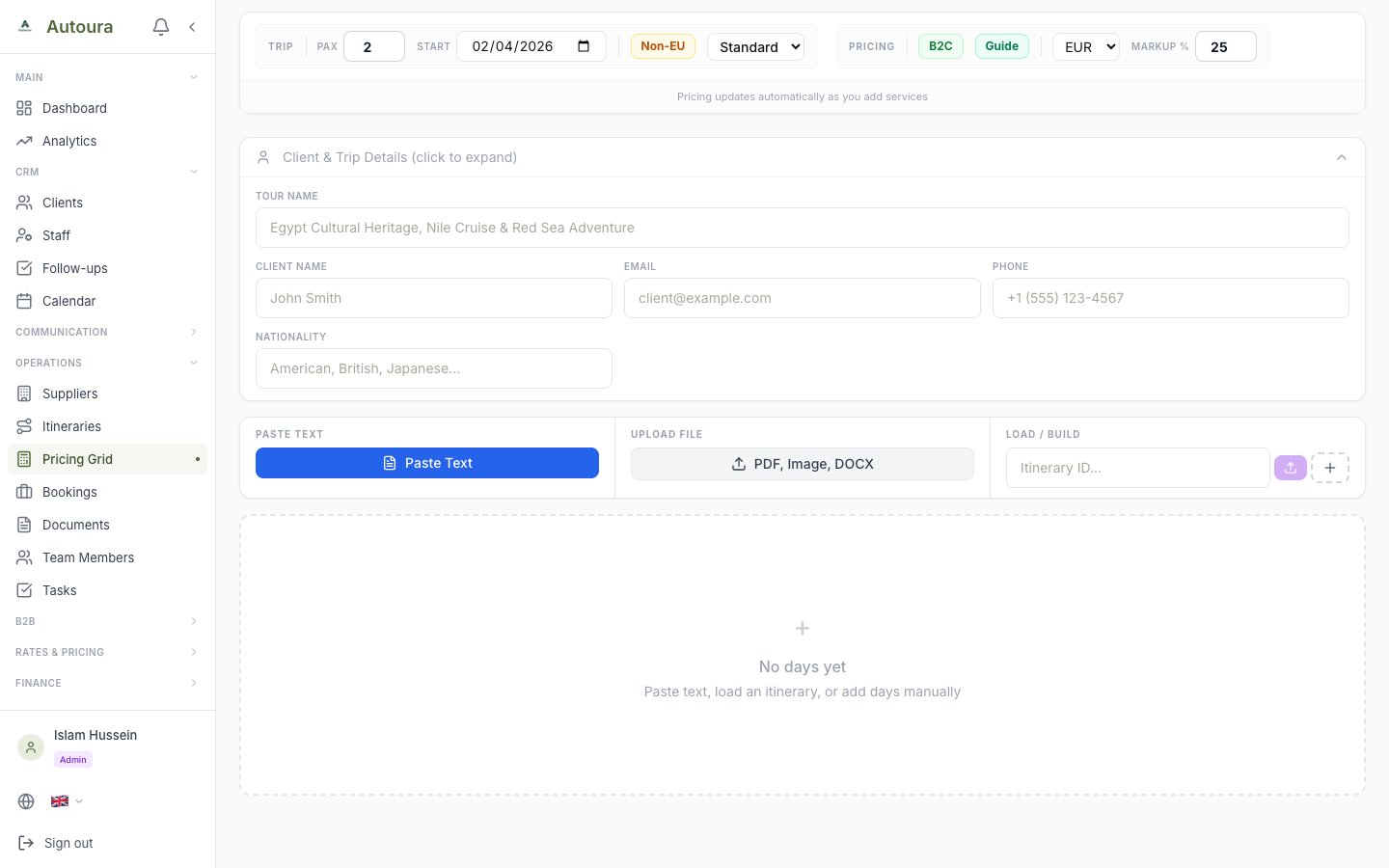
Pricing Grid showing trip settings bar, live quote strip, and the three input methods
Day-by-Day Service Slots
After AI parses the input, each day is displayed as an expandable card with 15 service slots, split into group services (charged once and divided by pax) and per-person services (multiplied by pax):
Group services
- Transport — Vehicles and transfers between cities
- Guide — Tour guide for the day
- Airport Services — Meet and greet, VIP lounge
- Hotel Services — Hotel staff services
- Tipping — Tips for guide, driver, and staff
- Boat Rides — Felucca, motorboat, and similar
- Other (Group) — Custom group-level costs
Per-person services
- Accommodation — Hotel for the overnight
- Entrance Fees — Attraction tickets (EU/Non-EU rates)
- Flights — Domestic flights between cities
- Experiences — Optional excursions and add-ons
- Meals — Lunch and dinner by tier
- Water — Daily water allowance
- Nile Cruise — Cruise rates by cabin type and season
- Other (PP) — Custom per-person costs
Each slot shows the selected rate from your database. Click any slot to expand it, change the selection, or override the price manually. Expand All / Collapse All buttons open or close every day card at once.
Day types
Every day has a Day Type preset — Arrival, Tour, Transfer, Cruise, Free day, or Departure. The day type determines which slots are expected for that day, and drives the completeness check that must pass before you can save.
Live Pricing
The live quote strip updates in real time as you edit. It shows:
- Cost/PP — Total supplier cost per person
- Total Cost — Cost for all travelers
- Margin — Your profit based on the margin percentage
- Sell/PP — Selling price per person
- Sell Total — Total selling price for the group
Change PAX, tier, dates, or currency and the entire quote recalculates instantly. Below the day cards, a Grand Summary card totals the whole trip by category.
Saving the Itinerary
When you're satisfied with the itinerary and pricing, use Save as Itinerary (B2C mode) or Save as B2B Quote (B2B mode). Saving creates:
- An itinerary record with a unique code (e.g., ITN-S-2026-024)
- All days and services stored in the database for future editing
- A client record created or linked automatically
After a successful save, a View link takes you straight to the saved itinerary or quote.
B2B Output
When pricing mode is set to B2B with a partner selected, saving creates a B2B quote and redirects to the B2B Calculator (/b2b/calculator/[variation_id]), where the rate sheet is generated.
What the AI Understands
The parser handles a wide range of input formats:
- WhatsApp conversations — Copy-paste directly, including multi-message threads
- Emails — Full email text including headers
- Tour operator shorthand — “3NTS CAI + 4NTS CRZ + 2NTS HRG”
- Structured day plans — “D1 CAI/ALX/CAI”, “D2 CAI - Pyramids”
- PDF itineraries — Scanned or digital PDFs via file upload
- Photos of handwritten requests — Images parsed via AI vision